Call Us
Free toolkit · spreadsheet + PDF
Tag every link the same way, and know where GA4 will file it
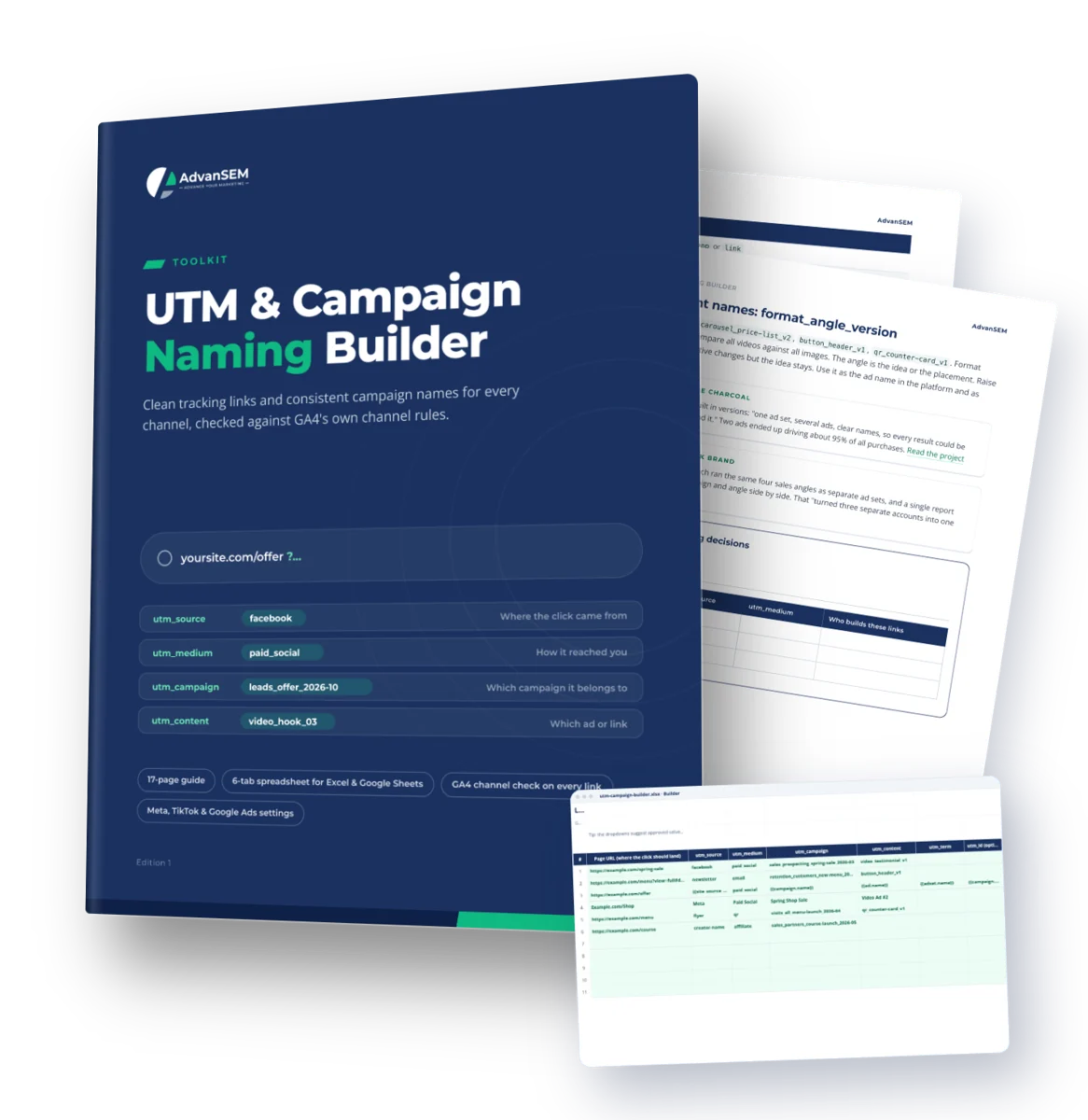
A free spreadsheet and 17-page guide for owners and marketers who want clean tracking links and campaign names that hold up across every channel.
Free download6-tab spreadsheet17-page guideGA4 channel check on every link
- A link builder for Excel and Google Sheets that lowercases, cleans and checks every link
- A GA4 channel prediction on every row, built from Google's published rules and source list
- Ready-to-paste parameter strings for Meta and TikTok, and the right Google Ads setting
FreeInstant download
Free. Checkout asks only for your email and name.
- Spreadsheet for Excel and Google Sheets
- 17-page PDF guide
- Download links by email, yours to keep
- Free updates to this edition
Secure checkout by Stripe. Files arrive on screen and by email the moment you pay.
Sound familiar
Reports that won't line up, because every link is tagged differently
One capital letter or an unlisted source is enough to file a click under the wrong channel for as long as the report exists.
Three names for one source
GA4 shows Facebook, facebook and fb as three different sources.
Email lands in Unassigned
Half our email traffic ends up in Unassigned, and I don’t know why.
Meta ads as Paid Other
Our Meta ads show up as Paid Other instead of Paid Social.
Everyone names it their way
Everyone on the team names campaigns differently, so nothing lines up in the reports.
A QR code with no data
I printed a QR code, and I have no idea whether anyone scanned it.
UTMs on Google Ads?
I’m not sure whether I should add UTMs to our Google Ads or not.
819
sources on Google’s own GA4 list decide whether a paid click counts as Paid Social, Paid Search or Paid Video. “meta” isn’t one of them, so utm_source=meta lands in Paid Other.
Source: Google Analytics Help
What you get
A link builder that checks its own work, and a short guide to the rules
Paste a page URL, pick a source and medium, and the builder returns a clean link, the likely GA4 channel and anything to fix.
The builder (XLSX, 6 tabs)
60 link rows with 16 checks each, campaign and ad name builders, a team dictionary of 22 sources and 12 mediums, a 150-row link log and Google’s 819 GA4 sources.
The guide (PDF, 17 pages)
5 short chapters on how GA4 reads tags and assigns channels, a naming convention, platform settings and common mistakes, plus a one-page cheat sheet.
Meta, TikTok and Google Ads settings
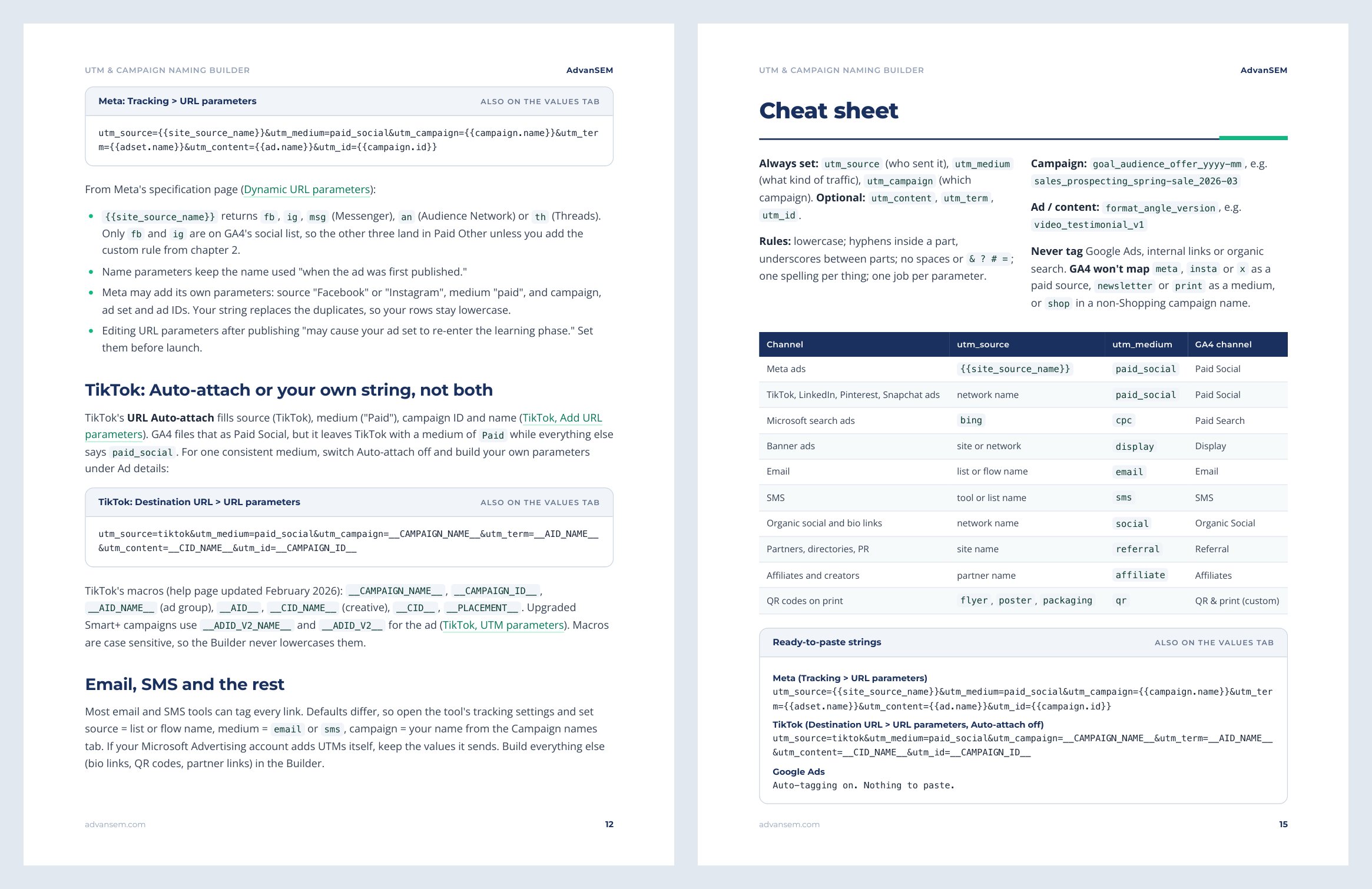
Ready-to-paste URL parameter strings for Meta and TikTok ads that keep their macros intact, and how to confirm Google Ads auto-tagging is on.
Chapter by chapter
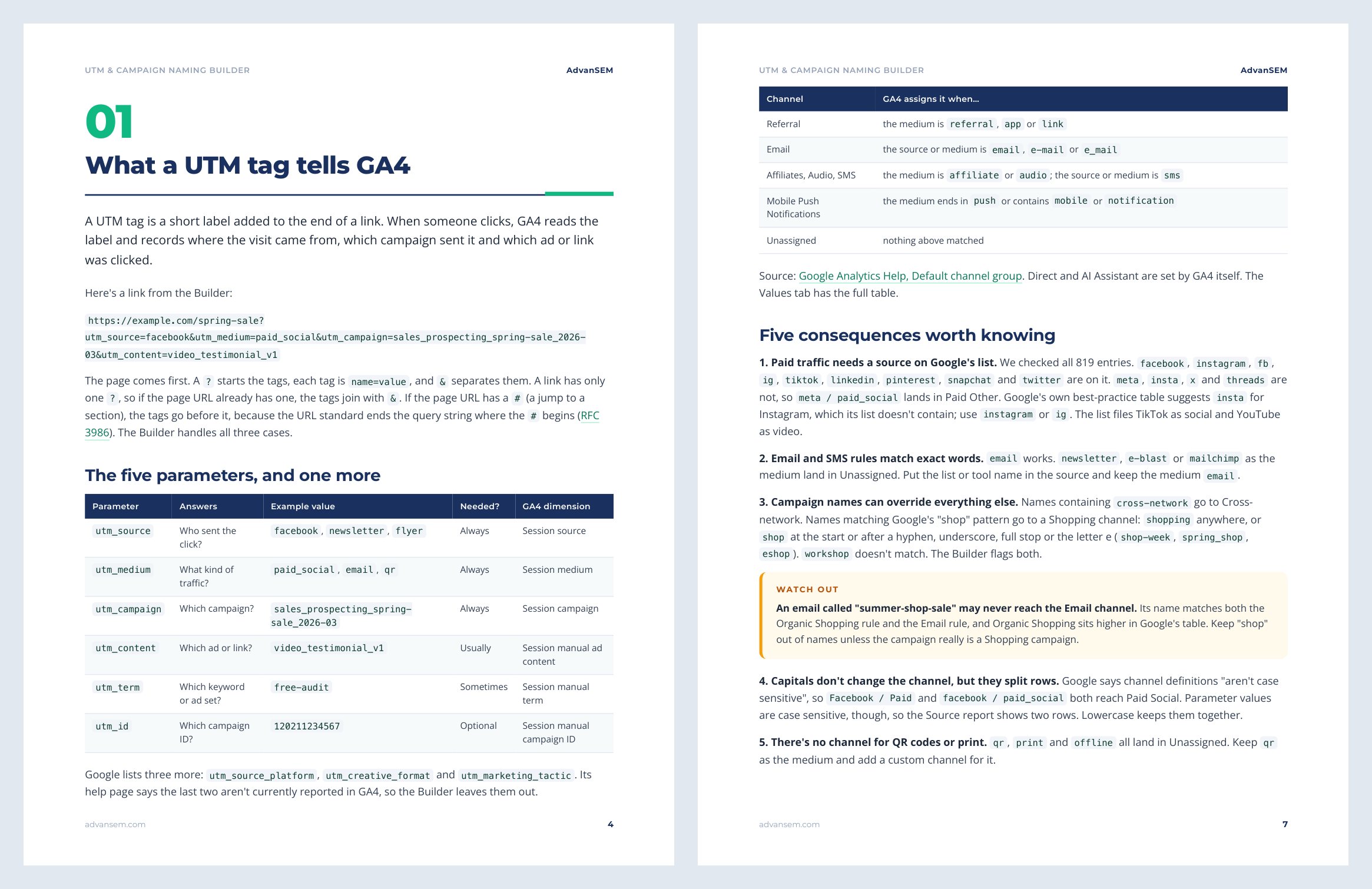
- What a UTM tag tells GA4
- How GA4 turns your tags into channels
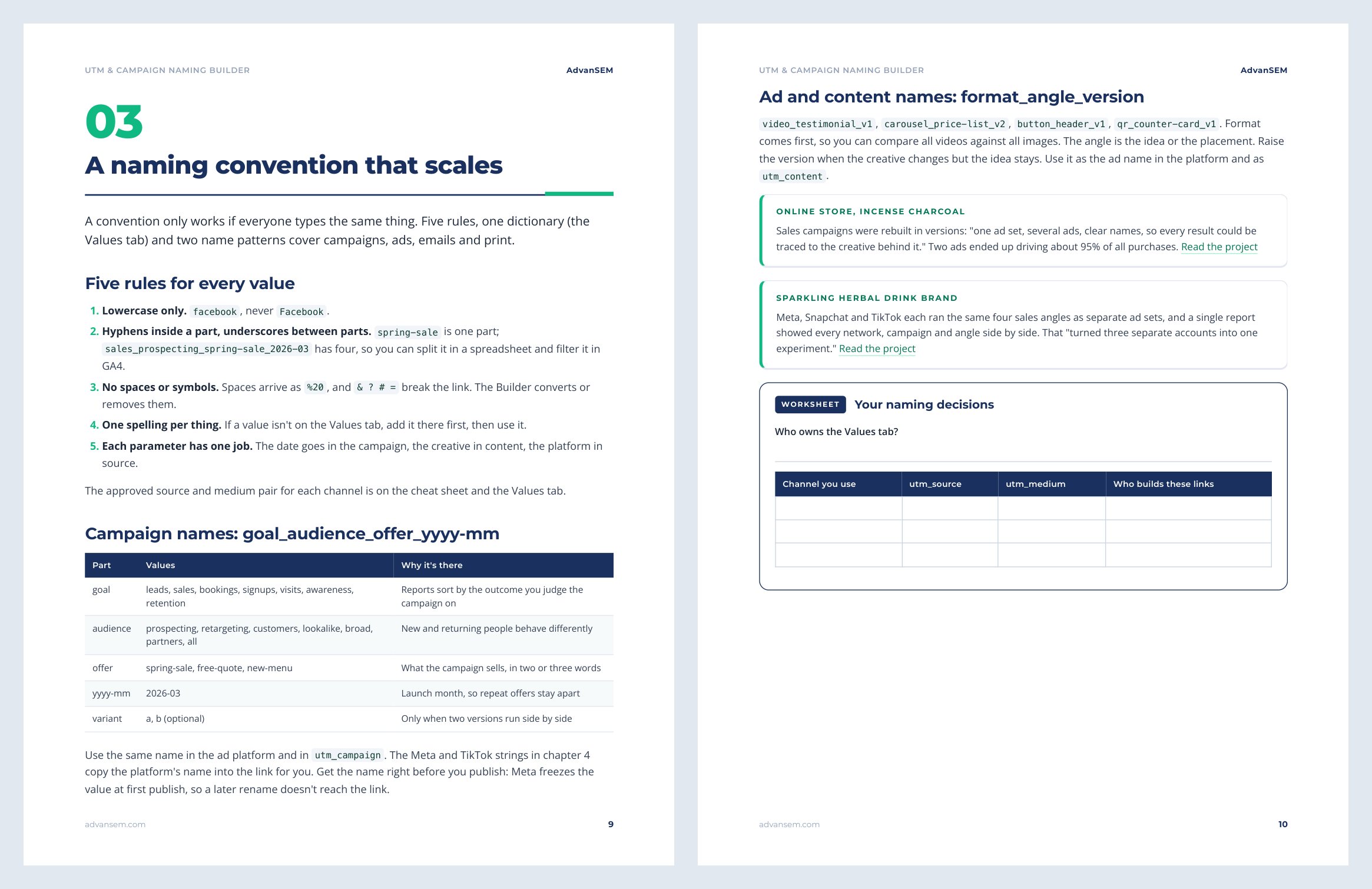
- A naming convention that scales
- Auto-tagging and platform parameters
- Common mistakes and how to fix them
Look inside
Real pages from the guide
Five short chapters and a one-page cheat sheet to keep next to the spreadsheet.
After you work through it
What you can do from your next link
- Build a correctly tagged link for any channel in under a minute, with no capitals, spaces or broken ? and &
- See before you publish whether a click will land in Paid Social, Email, SMS or Unassigned
- Name every campaign and ad the same way, so reports sort by goal, audience and offer
- Set Meta and TikTok to tag every ad automatically, and confirm Google Ads auto-tagging is doing its job
- Give QR codes and print a channel of their own in GA4, and log every printed link so you can find it later
From our work
Clean naming in our client work
Both projects appear in the guide and are written up on our site, with the numbers.
ONLINE SALES
121 sales from 15 tracked creator links
An online course gave each creator a tracked checkout link and coupon: 2,610 clicks at a 4.6% conversion rate, more than every ad combined.
ONLINE SALES
Two clearly named ads drove about 95% of purchases
An incense charcoal brand rebuilt its campaigns with clear names, so every result could be traced to the creative behind it.
Is it right for you
Who gets the most from it
Made for you if
- You run ads, send emails or post on social, and report in GA4
- You are an assistant or junior marketer who builds links for a team and needs one standard
- You are an agency or freelancer who wants a naming convention to hand to clients
Probably not for you if
- GA4 isn't installed on your site yet
- You need server-side tracking, CRM integration or conversion setup: tags label the visit, they don't record the sale
- You run app-install campaigns, which use their own attribution tools
How to use it
STEP 1
10 minutes
Read chapters 1 and 2 of the guide.
STEP 2
10 minutes
Trim the Values tab to the sources you use and name one owner for it.
STEP 3
Once
Add a QR and print channel in GA4 if you print anything, and paste the Meta and TikTok strings into your live ads.
STEP 4
Every new link, under a minute
Build it in the Builder, read the checks, then record it in the Link log.
Works in Excel 2010 or later and Google Sheets, using standard functions only: no macros, scripts or add-ons.
Questions
What marketers ask before they download
Why is it free?
Because good tracking is where every other marketing improvement starts: without clean source and campaign data, there's nothing reliable to improve. The download arrives by email.
What format is it, and which tools does it work with?
An .xlsx spreadsheet and a PDF guide. The spreadsheet works in Microsoft Excel 2010 or later and Google Sheets: upload it to Drive and open it, or use File > Import. The links it builds work with GA4 and any analytics tool that reads UTM parameters.
Who is it for?
Anyone who builds links for ads, emails, social posts, QR codes or partners and reports in GA4: owners, in-house marketers, assistants and agencies. You don't need to know any formulas.
Should I add UTMs to my Google Ads?
No. Google states that GA4 gives auto-tagging priority over manual tags. The guide shows how to check that auto-tagging is on, and gives an optional Final URL suffix if you want campaign or keyword IDs in your CRM.
Can it tell me exactly which channel GA4 will use?
It predicts the channel from Google's published rules and source list. GA4 makes the final call and Google can change the rules, so treat the prediction as a strong check rather than a guarantee.
How do I receive it?
Checkout asks only for your email and name. The download links appear on screen as soon as you complete it, and the same links arrive by email. They keep working, so you can download again later.
Instant download
Tag your next link the right way
The builder and the 17-page guide, free, with the download links sent to your email.
FreeInstant download
Free. Checkout asks only for your email and name.
- Spreadsheet for Excel and Google Sheets
- 17-page PDF guide
- Download links by email, yours to keep
- Free updates to this edition
Secure checkout by Stripe. Files arrive on screen and by email the moment you pay.
Pairs well with